
Key For Upgrade Windows Server trial version to Full version (2012/ 2016/ 2019/ 2022)
Search for a command to run...
No comments yet. Be the first to comment.
Install https://github.com/bangtutorial/streamflow/ Buat file script /root/clean_streamflow_data.sh: sudo nano /root/clean_streamflow_data.sh isi dengan script dibawah: #!/bin/bash # Log waktu pembersihan echo "=== Pembersihan otomatis dimulai...
Kalau kamu masih pakai email seperti kamu123@gmail.com untuk urusan kerja, freelance, atau bisnis, trust dari calon klien biasanya lebih rendah. Bandingkan: kamu123@gmail.com vs hello@namakamu.com Yan
Workflow ini berfungsi untuk mencatat setiap lamaran pekerjaan yang dikirim melalui pesan Telegram langsung ke Google Sheets secara otomatis menggunakan n8n.Setiap kali kamu mengirim pesan berisi detail lamaran ke bot Telegram, sistem akan menuliskan...
Bagi banyak developer, aapanel menjadi pilihan populer karena tampilan yang ramah pengguna dan fitur lengkap untuk mengelola server. Jika Anda membangun aplikasi React menggunakan Vite, proses deploy di aapanel sebenarnya sederhana namun cukup sulit ...
aaPanel adalah kontrol panel server berbasis web yang memudahkan pengguna dalam mengelola layanan hosting seperti web server, database, FTP, dan SSL tanpa perlu mengetik perintah terminal yang rumit. Panel ini merupakan alternatif populer untuk cPane...

Have you ever experienced emails from your server not reaching their destination — just disappearing? They've been sent without any errors, but the recipient never gets them. In this case, the issue is most likely in the email delivery process — it c...

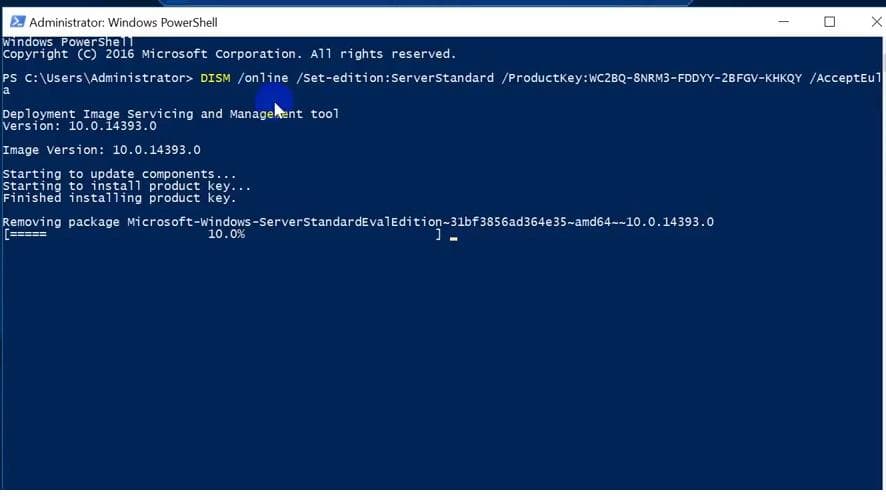
Run the following command:
DISM /online /Set-Edition:ServerDatacenter /ProductKey:XXXXX-XXXXX-XXXXX-XXXXX-XXXXX /AcceptEula
Replace XXXXX-XXXXX-XXXXX-XXXXX-XXXXX with the key corresponding to the version you want to upgrade to. The key is at the bottom of the article.
After running the command, the system will ask you if you want to restart the computer, enter Y to agree, the system will automatically restart.
Example:DISM /online /Set-Edition:ServerDatacenter /ProductKey:WMDGN-G9PQG-XVVXX-R3X43-63DFG /AcceptEula
DISM /online /Set-Edition:ServerStandard /ProductKey:XXXXX-XXXXX-XXXXX-XXXXX-XXXXX /AcceptEula
DISM /online /Set-Edition:ServerEnterprise /ProductKey:XXXXX-XXXXX-XXXXX-XXXXX-XXXXX /AcceptEula
Windows Server 2022 Datacenter
WX4NM-KYWYW-QJJR4-XV3QB-6VM33
Windows Server 2022 Standard
VDYBN-27WPP-V4HQT-9VMD4-VMK7H
Windows Server 2019 Datacenter
WMDGN-G9PQG-XVVXX-R3X43-63DFG
Windows Server 2019 Standard
N69G4-B89J2-4G8F4-WWYCC-J464C
Windows Server 2016 Datacenter
CB7KF-BWN84-R7R2Y-793K2-8XDDG
Windows Server 2016 Standard
WC2BQ-8NRM3-FDDYY-2BFGV-KHKQY
Windows Server 2012 R2 Datacenter
W3GGN-FT8W3-Y4M27-J84CP-Q3VJ9
Windows Server 2012 R2 Standard
D2N9P-3P6X9-2R39C-7RTCD-MDVJX
Windows Server 2012 Datacenter
48HP8-DN98B-MYWDG-T2DCC-8W83P
Windows Server 2012 Standard
XC9B7-NBPP2-83J2H-RHMBY-92BT4
Windows Server 2008 R2 Datacenter
74YFP-3QFB3-KQT8W-PMXWJ-7M648
Windows Server 2008 R2 Standard
YC6KT-GKW9T-YTKYR-T4X34-R7VHC
Windows Server 2008 R2 Enterprise
489J6-VHDMP-X63PK-3K798-CPX3Y
Windows Server 2008 Datacenter
7M67G-PC374-GR742-YH8V4-TCBY3
Windows Server 2008 Standard
TM24T-X9RMF-VWXK6-X8JC9-BFGM2
Windows Server 2008 Enterprise
YQGMW-MPWTJ-34KDK-48M3W-X4Q6V